PHP2Shell Explained: Two Critical PHP Bugs (CVE-2026-109618 & 109619) and How to Check Your Server
What the PHP2Shell vulnerabilities are, why patching your app isn't enough, and how to check and update your own PHP safely. Conceptual, no exploit details.
- type
- news explainer
- published
- last updated

Hey, I’m Patch. This is a news explainer, so a quick ground rule: we cover how this works conceptually and how to defend, with no exploit code and no attack steps. And as always, only test systems you own or have written permission to test. The one thing I’ll show you checking is your own PHP version, on your own machine.
This week two bugs in PHP itself had governments taking websites offline. Not a plugin, not a theme, the engine underneath. The researchers nicknamed them “PHP2Shell”, which tells you what they were worried about. Let’s look at what happened, who’s affected, and what to do, calmly.
Last updated: 24 October 2026. This story is still developing. The facts below were re-checked against primary sources on this date; see the dated notes and the sources at the end, and check those sources for anything newer.
What happened
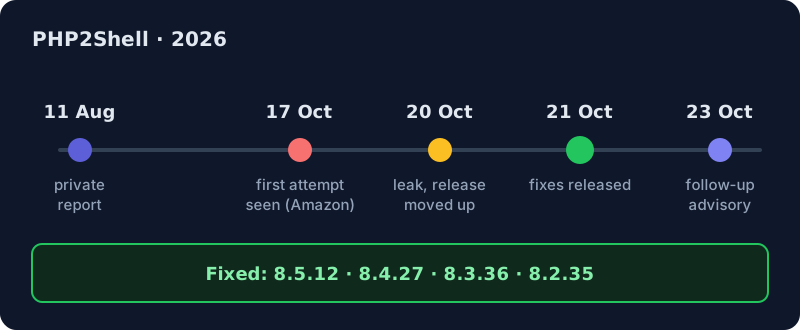
PHP is the language behind a huge chunk of the web: WordPress, Drupal, Joomla, Magento, Nextcloud and many Laravel apps all run on it. Back in August 2026, researchers reported memory bugs deep in PHP’s core to the PHP security team, and others found related issues independently. This is coordinated disclosure: tell the maintainers first and give them time to fix it before the details are public.
The public release was planned for Thursday 22 October. Then, on the morning of 20 October, details leaked online. The PHP team pre-announced and moved the release forward one day. On 21 October 2026 they shipped fixes for two vulnerabilities, CVE-2026-109618 and CVE-2026-109619.
Why it matters
Both bugs are rated CVSS v4.0 9.2, Critical. Here’s why the score is so high: an attacker doesn’t need a login, nobody has to click anything, and it works over the network. The possible result is unauthenticated remote code execution, jargon for a stranger running their own commands on your server, as the web worker’s user. There’s also a memory-disclosure angle, which means passwords, tokens or API keys sitting in memory could leak.
To be fair, the same rating notes “high attack complexity”, so this isn’t a one-click trick. But the researchers say they demonstrated it against current versions of popular PHP applications. And here’s the key point:
The bug is in PHP, not in the app. So “I keep WordPress updated” does not protect you here.
How big is this? PHP runs on roughly 70% of websites whose server-side language is known. Not every one is exploitable in practice, but that is the size of the haystack. The U.S. agency CISA told organisations that can’t patch, or that still run PHP 8.1 or older, to take those systems offline until they can. That is not a sentence you hear every week.
And attackers didn’t wait for the patch. Amazon says its honeypots (decoy servers set up to attract attacks) saw a first attempt on 17 October, four days before the fix. Since the release, attempts have climbed into the millions. The better news, as of this writing: most of the exploit code being sprayed around doesn’t actually work, and no successful break-in has been publicly confirmed. As of 24 October, neither CVE is in CISA’s Known Exploited Vulnerabilities catalogue. The practical lesson is simple: if you run PHP, check your logs from 17 October onward, not just from patch day.
How it works, conceptually
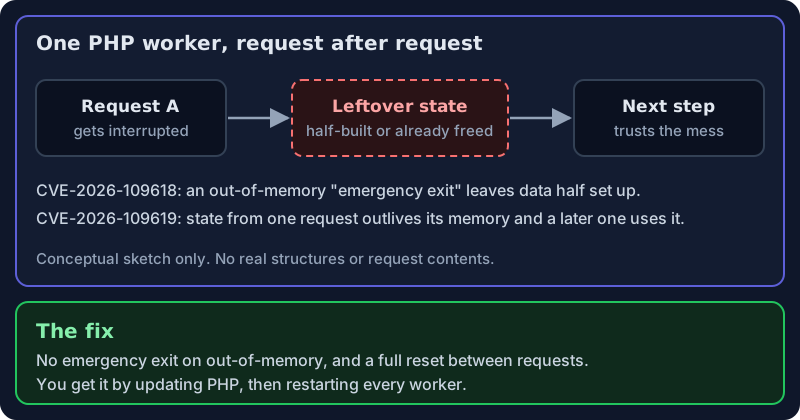
Analogy time. Picture a hotel, where PHP is the housekeeping crew. Each web request is a guest: a worker sets up a room, the guest leaves, the worker cleans up. On most modern servers the same worker handles room after room all day, which is efficient, and which is also where these bugs live.
CVE-2026-109618 is about running out of memory. When PHP hits its memory limit, in the vulnerable versions it jumps straight out of the request instead of finishing politely. If that happens while a request’s internal data is only half set up, later cleanup can trust that half-built data as if it were complete.
CVE-2026-109619 is about leftovers. State that belonged to one request can survive after its memory was freed. A later request handled by the same long-lived worker can touch that stale state before normal setup resets it. Programmers call that a “use-after-free”: using memory after you’ve handed it back.
Put shortly: an interrupted request leaves a mess, and the next step trusts the mess.
One more detail worth sitting with: both research teams say AI tools helped them comb PHP’s source for these interruptible code paths. That cuts both ways. Defenders can find old bugs faster, and so can attackers. The humans still did the hard part.
Am I affected? How to check, safely
The only thing I’ll demonstrate is a version check, on a local, offline lab box. No scanning of anyone else’s server.
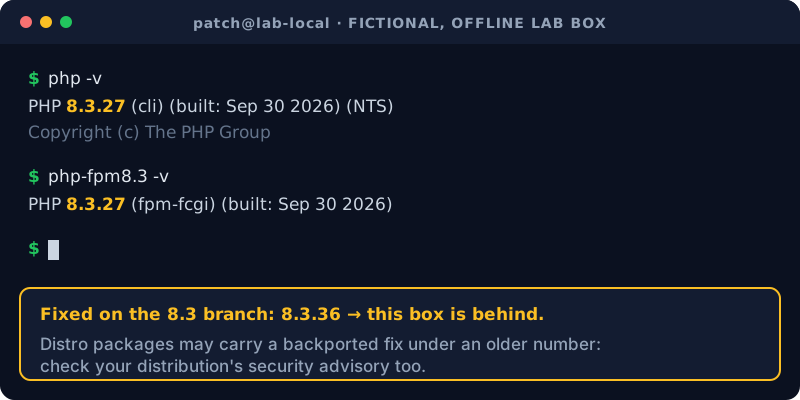
First, which PHP version is installed on the command line? Run php -v. Compare what it prints to the fixed versions
below. The catch is that the command-line PHP and the PHP serving your website can be different builds, so also check
the web side, for example the PHP-FPM binary with its own -v.
The fixed versions, released 21 October 2026, are:
| Branch | Fixed version |
|---|---|
| 8.5 | 8.5.12 |
| 8.4 | 8.4.27 |
| 8.3 | 8.3.36 |
| 8.2 | 8.2.35 |
PHP 8.1 and older no longer receive updates from the PHP project. There is a second catch: Linux distributions often backport fixes, so your version number might look old while the fix is already in. Check your distribution’s security advisory and your package manager, not just the upstream number. On shared hosting, look in your control panel or ask your host; many large hosts patched quickly.
What to do
- Update. It’s the only complete fix. Move to 8.5.12, 8.4.27, 8.3.36 or 8.2.35, or your distro’s patched package.
- Restart PHP after updating. Long-running workers (PHP-FPM, Apache mod_php) keep the old code in memory until they restart. An update without a restart is a very confident placebo.
- On 8.1 or older? There’s no official fix. Some distributions and support vendors backported it; otherwise it’s time to move to a supported branch. Note that PHP 8.2 itself reaches end of life on 31 December 2026, so you may want to skip straight to 8.4 or 8.5.
- Can’t patch today? The PHP team lists partial hardening in its advisory (for example, turning off a setting called session upload progress in your main PHP config, and keeping request-size limits tight). That same setting also covers a smaller follow-up issue the PHP team flagged on 23 October, with a full advisory promised in the next release. A web application firewall can buy time. But PHP is very clear: there are no complete mitigations. Updating is the only safe choice.
A warning to finish on: “proof of concept” downloads for this bug are floating around, and some may be malware aimed at curious people. Don’t run random exploit code, especially not on your own laptop. That’s why this article links to vendor advisories and nothing else.
The bigger lesson
- Your stack has layers. Patching the app isn’t enough if the runtime underneath is old.
- Know what you run. An inventory beats panic. Plenty of people found PHP this week inside appliances and control panels they’d forgotten about.
- End of life is a security decision. “It still works” is not the same as “it’s still fixed”.
This also went right in an important way: researchers reported privately, maintainers fixed it, and distributions got patches early. That coordination is the quiet part of security news that actually works.
That’s the news. Not the panic: the understanding. Stay curious. Stay authorized.
Sources
- PHP security advisory, 21 Oct 2026 — php.net/archive/2026.php#2026-10-21-5
- PHP pre-announcement, 20 Oct 2026 — php.net/archive/2026.php#2026-10-20-1
- PHP informational advisory (session upload progress), 23 Oct 2026 — php.net/archive/2026.php#2026-10-23-1
- GitHub advisory, CVE-2026-109618 — GHSA-w8hw-w9fx-j79w
- GitHub advisory, CVE-2026-109619 — GHSA-6wmf-4rv5-p3rp
- CISA alert, 21 Oct 2026 — cisa.gov critical-vulnerabilities-php
- CISA Known Exploited Vulnerabilities catalog — cisa.gov/known-exploited-vulnerabilities-catalog
- Canadian Centre for Cyber Security, AL26-026 — cyber.gc.ca/en/alerts-advisories/al26-026
- Amazon Threat Intelligence (MadPot), 21 Oct 2026 — aws.amazon.com security blog
- Google Cloud guidance — cloud.google.com responding-to-core-php-vulnerabilities
- Tenable FAQ — tenable.com php2shell FAQ
- Huntress rapid response — huntress.com php2shell