HackerDNA Daily Hack: The Folder That Shipped Itself (Exposed .git Directory)
Why deploying with git pull can publish your whole repository, how to confirm an exposed .git over HTTP, and how to deploy safely. Spoiler-free Daily Hack guide.
- platform
- HackerDNA
- difficulty
- easy
- published

Hey, I’m Patch. Today’s weakness is a folder that came along for the ride. Everything here happens in a legal practice lab on HackerDNA, and the company in it is fictional. Only test systems you own or have written permission to test.
This OSINT Daily Hack is a recon exercise. A fictional shop deploys its website by running git pull on the server,
and the entire .git directory ended up served to the public. Your job is to confirm the directory is exposed and
read the one file that turns a careless deploy into someone else’s credential.
I won’t hand over the answer. You’ll find it yourself in the challenge. What I’ll give you is the reasoning, and the fix.
What an exposed .git directory is
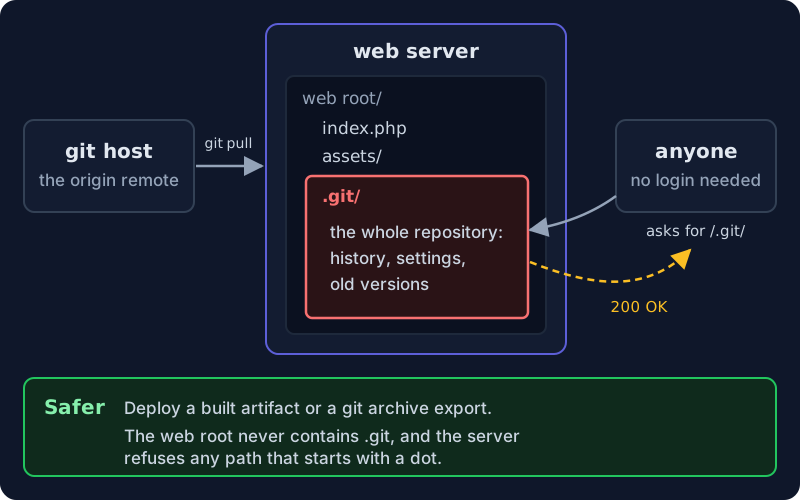
When you clone or git pull a project, Git keeps a hidden .git folder next to your files. That folder is not just a
copy of the code: it is the whole repository’s memory. Settings, the commit history, every version of every file that
was ever committed.
Deploying by running git pull on the web server is convenient, and it leaves that .git folder sitting right inside
the folder the web server publishes (the “web root”). If nothing blocks it, the server will hand those files to anyone
who asks, with no login.
Why it matters
Think about what a repository remembers. The .git/config file records where the project is pushed and pulled from,
the “origin remote”. If the project was ever cloned over HTTPS with a username and password baked into the URL, Git
writes that URL into config, secret and all. One request can return a deploy credential.
And it is worse than one file. Because the object store and pack files are there too, someone can rebuild the full history: every secret that was ever committed and later “removed”, every internal path, every earlier version of the code. Deleting a secret in a later commit does not delete it from history.
That is why this is an OSINT and recon lesson, not an “exploit” lesson. Nothing was broken into. The information was simply left on the doormat.
Approaching the challenge
You work from a recon box with curl, a normal tool for making HTTP requests. The whole thing is a few careful looks,
not an attack chain.
1. Confirm the directory is actually exposed
Point curl at the .git/ path of the fictional lab host and see whether the server lists it or serves its files.
If you get a real response instead of a 404, the folder is reachable. This is a read-only check of a lab you were
invited to test.
# Against the lab host only. Does /.git/ answer at all?
curl -s http://shop.example/.git/
2. Read the file that holds the secret, not the file that holds the branch
A common wrong turn: stopping at .git/HEAD. That file confirms the folder is exposed, but it only names the current
branch. The leaked credential lives in .git/config, under the origin remote. Read that file.
# The origin remote, and anything inlined into its URL, lives here.
curl -s http://shop.example/.git/config
3. Pick the right value out of the URL
If the remote URL contains credentials, it has a recognisable shape: https://<user>:<secret>@<host>/<repo>.git. The
username and the host are context, not the answer. The challenge asks for the leaked deploy token, which is the
secret part. Read the structure, take the right piece.
4. Answer what was asked
The token the challenge wants is deploy token, and you’ll find it yourself in the challenge. Don’t answer with the username or the host; they’re there to tempt you.
You never needed a single exploit. You needed to know where Git keeps its memory, and that an exposed repository is a disclosure, not a hack.
How defenders catch and prevent it
Keep the repository out of the served tree
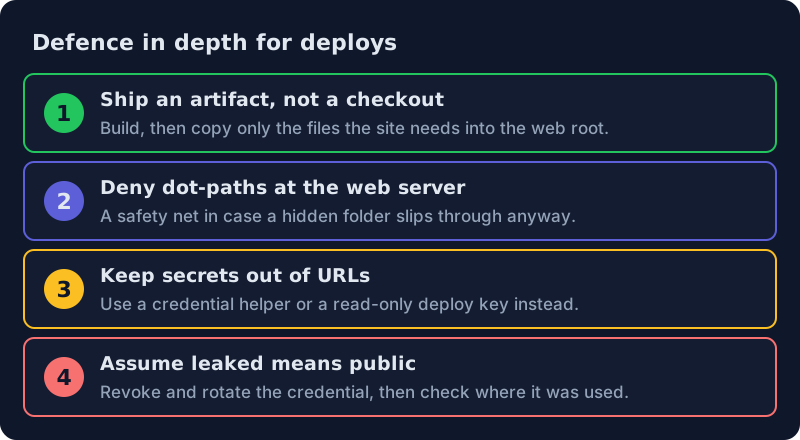
Don’t deploy a working checkout into the web root at all. Build the site and ship only the files it needs, or export a
clean copy with git archive. If .git is never in the published folder, it
can never be served.
Block dot-directories at the web server
As a safety net, configure the web server to refuse any path that starts with a dot, so .git, .env and friends are
denied even if one slips into the tree. That is belt-and-braces, not a substitute for keeping .git out.
Never inline credentials in a remote URL
Use a Git credential helper or a dedicated deploy key instead of putting a
token in the clone URL. A credential that is never written into config cannot leak from config.
Assume a leaked secret is public, and rotate it
If a credential ever reached the server’s repository files, treat it as already public. Revoke it, issue a new one, and check where it was used. Hoping nobody fetched it is not a plan.
Scan your own surface
Periodically check your public sites for a reachable /.git/ path, the same read-only check you did in the lab. Finding
it before a stranger does is the entire game.
Takeaways
.gitis the repository’s full memory, not just a copy of the code. History, settings and old versions are all in there.- Deploying with
git pullcan place that memory inside the public web root. HEADonly names a branch; the leaked credential is inconfig.- The safe pattern is to ship a built artifact, deny dot-paths, keep secrets out of URLs, and rotate anything exposed.
- A secret deleted in a later commit still lives in history. Rotate it.
Want to try the recon yourself? It’s a Daily Hack on HackerDNA (today’s is free; the archive is part of Pro). You can open HackerDNA here (affiliate link).
That’s the lab. Not the answer: the understanding. Stay curious. Stay authorized.